Susmita Biswas

TigiOS Banking

TigiOS Banking

TigiOS Banking

TigiOS Banking

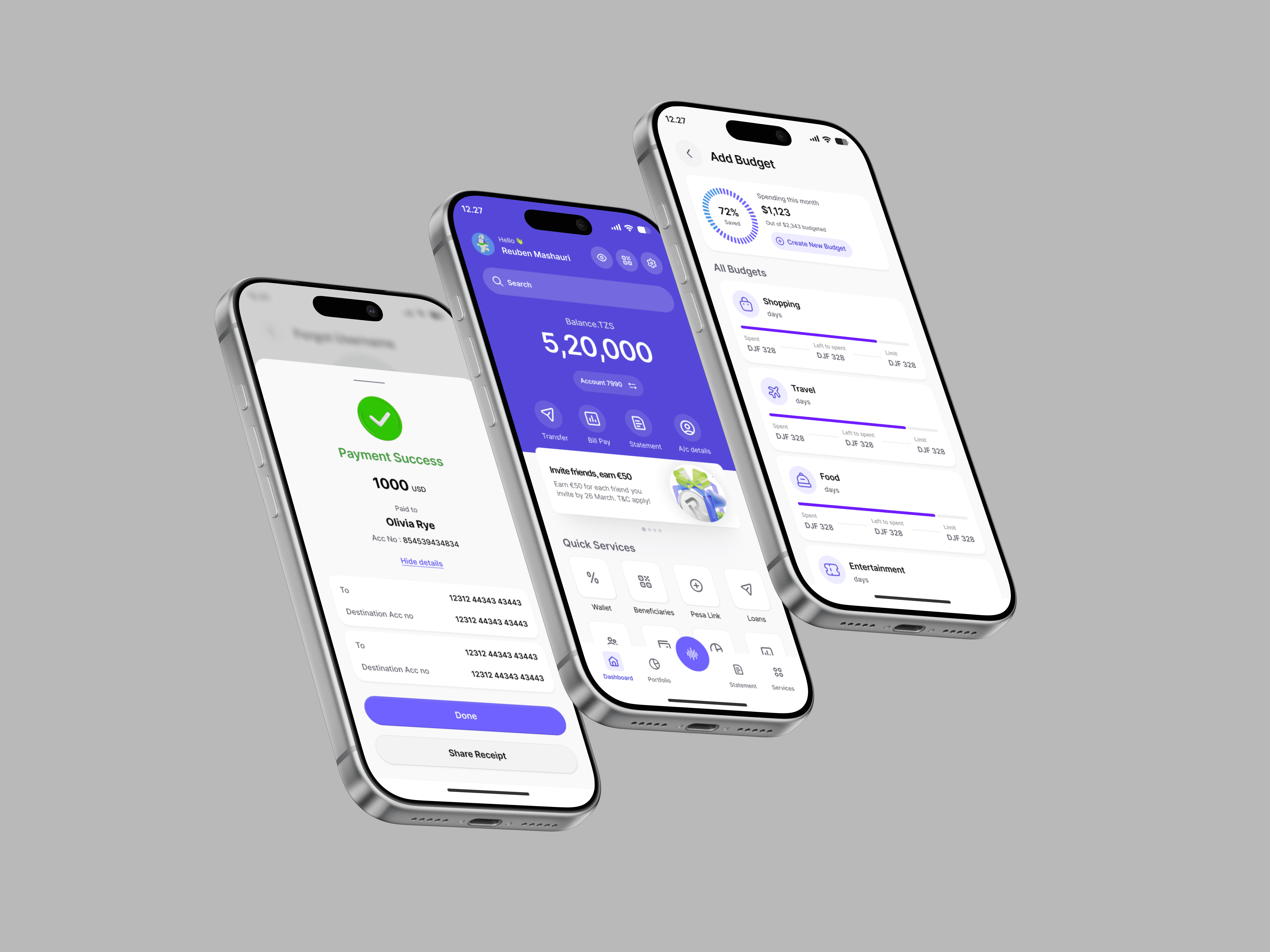
TigiOS is a comprehensive mobile banking app designed for customers across East Africa. It handles everything from everyday transfers and bill payments to loan applications, budget tracking, and investment portfolios — all in one place.

TigiOS is a comprehensive mobile banking app designed for customers across East Africa. It handles everything from everyday transfers and bill payments to loan applications, budget tracking, and investment portfolios — all in one place.

TigiOS is a comprehensive mobile banking app designed for customers across East Africa. It handles everything from everyday transfers and bill payments to loan applications, budget tracking, and investment portfolios — all in one place.

TigiOS is a comprehensive mobile banking app designed for customers across East Africa. It handles everything from everyday transfers and bill payments to loan applications, budget tracking, and investment portfolios — all in one place.

Banking

Design System

Product Design

Mobile App
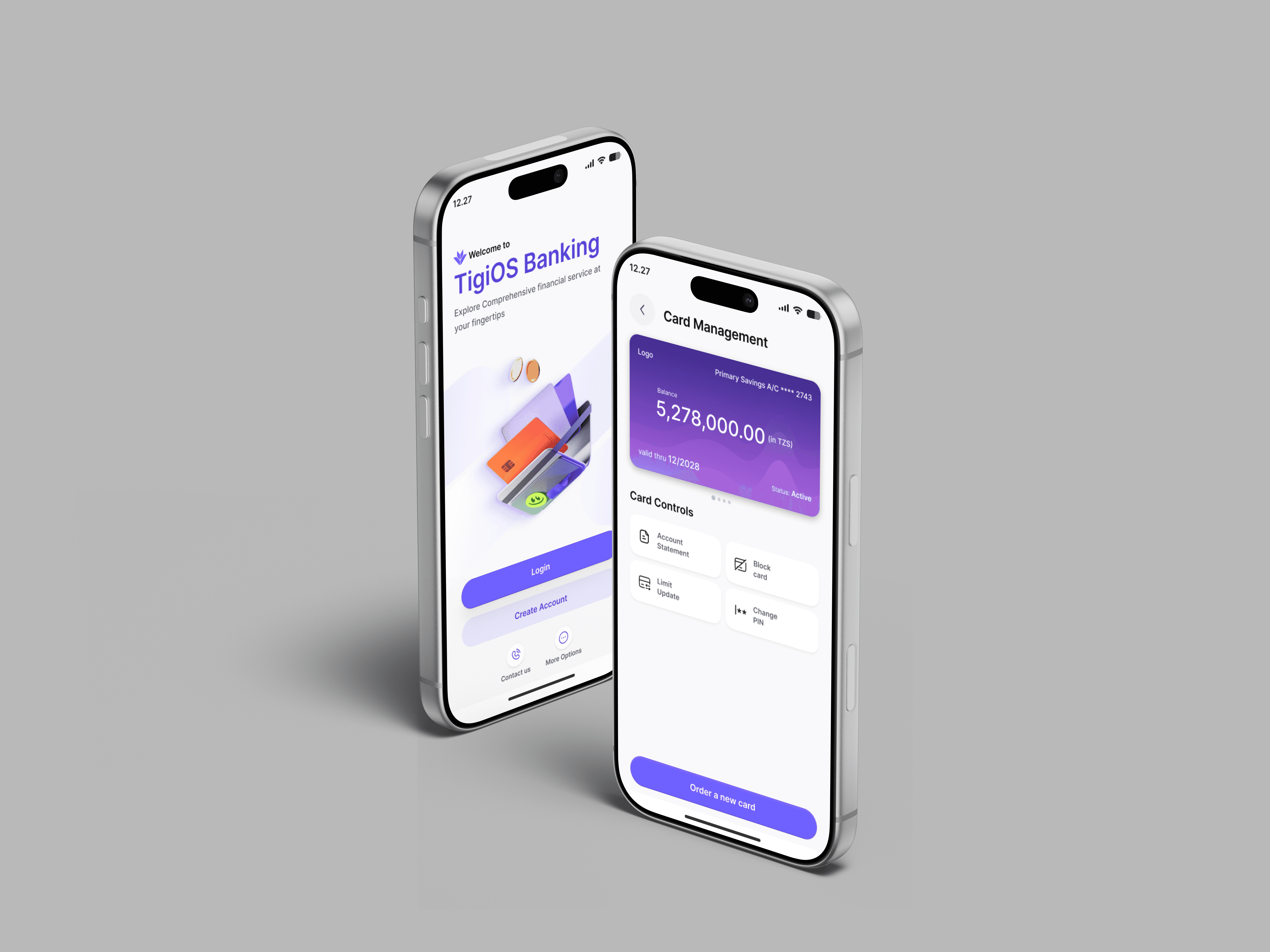
The experience covered key journeys such as logging in, checking balances, transferring money, paying bills, viewing statements, managing cards, exploring loans, creating budgets, and getting support through a chat assistant.


The overall goal was to create a modern banking experience that felt trustworthy, clear, and easy to use, while also supporting the bank’s wider business needs.

Client:

Techurate

My Role:

User Experience, User Interface, Prototyping, Interaction

Tools:

Figma, Miro, Agile Method

Timeline:

48 Weeks

The KPI

The main KPIs for this project were focused on both user experience and business value:

  • Increase completion rate for key banking actions such as transfers, bill payments, and statement checks

  • Reduce user drop-off during login and payment flows

  • Improve engagement with additional services like budgeting, loans, and card management

  • Encourage users to use self-service features instead of contacting support for simple tasks

  • Create better visibility for promotions and offers on the home screen
The Ask

The product needed to cover both core banking functions and supporting features, while keeping the experience smooth and consistent.

The ask was to design a mobile banking experience that would:


The product needed to cover both core banking functions and supporting features, while keeping the experience smooth and consistent.

The ask was to design a mobile banking experience that would:


Cross Platform Devices

Provides a unified view of patient data from various devices, enhancing quick decision-making.

Real-Time Monitoring

Enables continuous monitoring of critical vital signs, allowing immediate response to patient changes.

Data Analysis & Visualisation

Utilises advanced tools to analyse and visualise data trends, alarms, and events for better clinical decisions.

System Integration

Seamlessly integrates with other hospital systems like EMR, LIS, and RIS for a holistic patient overview.

Alarm Management

Features advanced alarm management to reduce clinician fatigue, customisable to patient needs.

Who

Everyday mobile banking users

What

Simple all-in-one banking app

Why

Make banking easy and clear

How

User-first flows and clean UI

The Challanges

Designing a banking app always comes with a few important challenges.

First, there was a lot of information to manage. Banking apps carry balances, accounts, payments, cards, statements, loans and more, so the experience could easily become crowded.


Second, some tasks were sensitive and needed extra clarity. For example, sending money, saving beneficiary details, checking deposit information or viewing account activity all need strong user confidence.


Third, the app had to feel useful for different kinds of users. Some people want quick actions, while others want help understanding their spending, savings or statements.


Lastly, the product had to balance function and trust. It needed to look modern and engaging without feeling too playful for a financial service.

Too many features, not enough space

The app needed to house 15+ services without the home screen becoming a wall of icons. Organisation was everything.

Building trust on a small screen

Financial apps live or die by trust. Users needed to feel safe sharing sensitive account details within seconds of opening the app.

Mixed levels of digital confidence

Some users were very comfortable with tech. Others weren't. The design had to work equally well for both, without patronising either.

Multi-currency, multi-market

The app needed to handle TZS, KES, USD, and more — without making users feel lost about which currency they were dealing with at any moment.

Too many features, not enough space

The app needed to house 15+ services without the home screen becoming a wall of icons. Organisation was everything.

Building trust on a small screen

Financial apps live or die by trust. Users needed to feel safe sharing sensitive account details within seconds of opening the app.

Mixed levels of digital confidence

Some users were very comfortable with tech. Others weren't. The design had to work equally well for both, without patronising either.

Multi-currency, multi-market

The app needed to handle TZS, KES, USD, and more — without making users feel lost about which currency they were dealing with at any moment.

Design Process

1

Discovery & Research

Interviews with 20 existing bank customers across Nairobi and Dar es Salaam. We mapped pain points: long queues, confusing USSD menus, fear of making transfer errors. These became our design targets.

2

Information Architecture

We ran card sorting sessions to understand how users mentally grouped banking tasks. The result was a four-tab structure — Dashboard, Portfolio, Statement, Services — that matched real-world mental models.

3

Low-fi Wireframes

Rough sketches first, always. We tested navigation patterns with paper prototypes before committing to a single pixel in Figma. This saved us from two bad ideas early on.

4

Visual Design & Prototyping

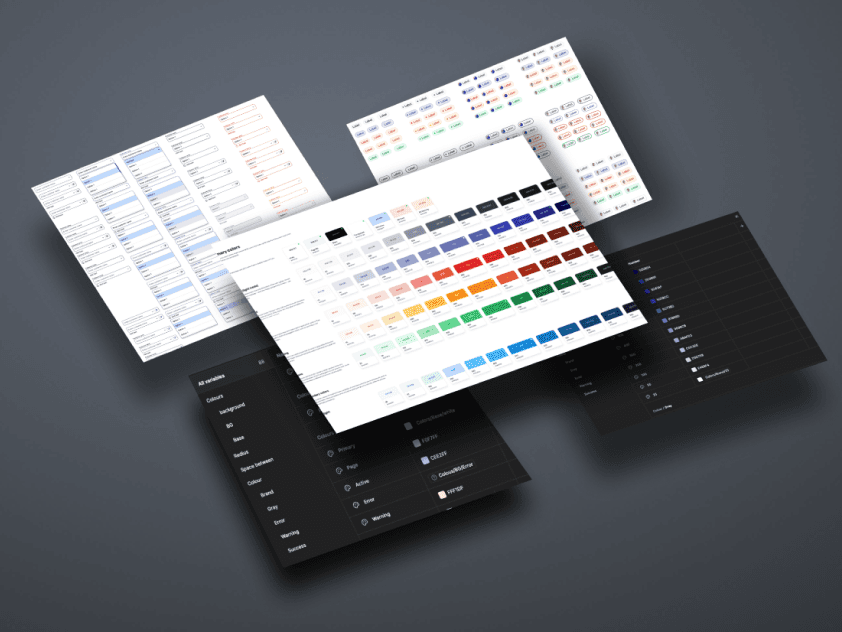
We built a full design system first — colour tokens, typography scale, component library — then assembled screens from components rather than designing each one from scratch. Consistency by default.

5

Usability Testing

Three rounds of testing with real users. We watched people try to send money, apply for a loan, and set a budget. Every moment of hesitation became a design fix.

Flows

Transfer Flow

Core

Home → Enter amount → Select payee (from saved beneficiary list or new) → Review → Confirm → Success receipt. Four screens, one goal.

Transfer Flow

Core

Home → Enter amount → Select payee (from saved beneficiary list or new) → Review → Confirm → Success receipt. Four screens, one goal.

Statement & Analysis Flow

Insight

Mini Statement → Filter by credits/debits → Statement Analyser with visual charts → Full Statement download. Makes sense of spending without requiring effort.

Statement & Analysis Flow

Insight

Mini Statement → Filter by credits/debits → Statement Analyser with visual charts → Full Statement download. Makes sense of spending without requiring effort.

Loan Application Flow

Self-serve

Home → Enter amount → Select payee (from saved beneficiary list or new) → Review → Confirm → Success receipt. Four screens, one goal.

Loan Application Flow

Self-serve

Home → Enter amount → Select payee (from saved beneficiary list or new) → Review → Confirm → Success receipt. Four screens, one goal.

Budget Management Flow

Planning

Add Budget → Select monthly/yearly → Set limit → Choose categories (Food, Shopping, Travel, etc.) → Set & track. Visual progress bars keep it honest.

Budget Management Flow

Planning

Add Budget → Select monthly/yearly → Set limit → Choose categories (Food, Shopping, Travel, etc.) → Set & track. Visual progress bars keep it honest.

AI Chat Assistant Flow

Support

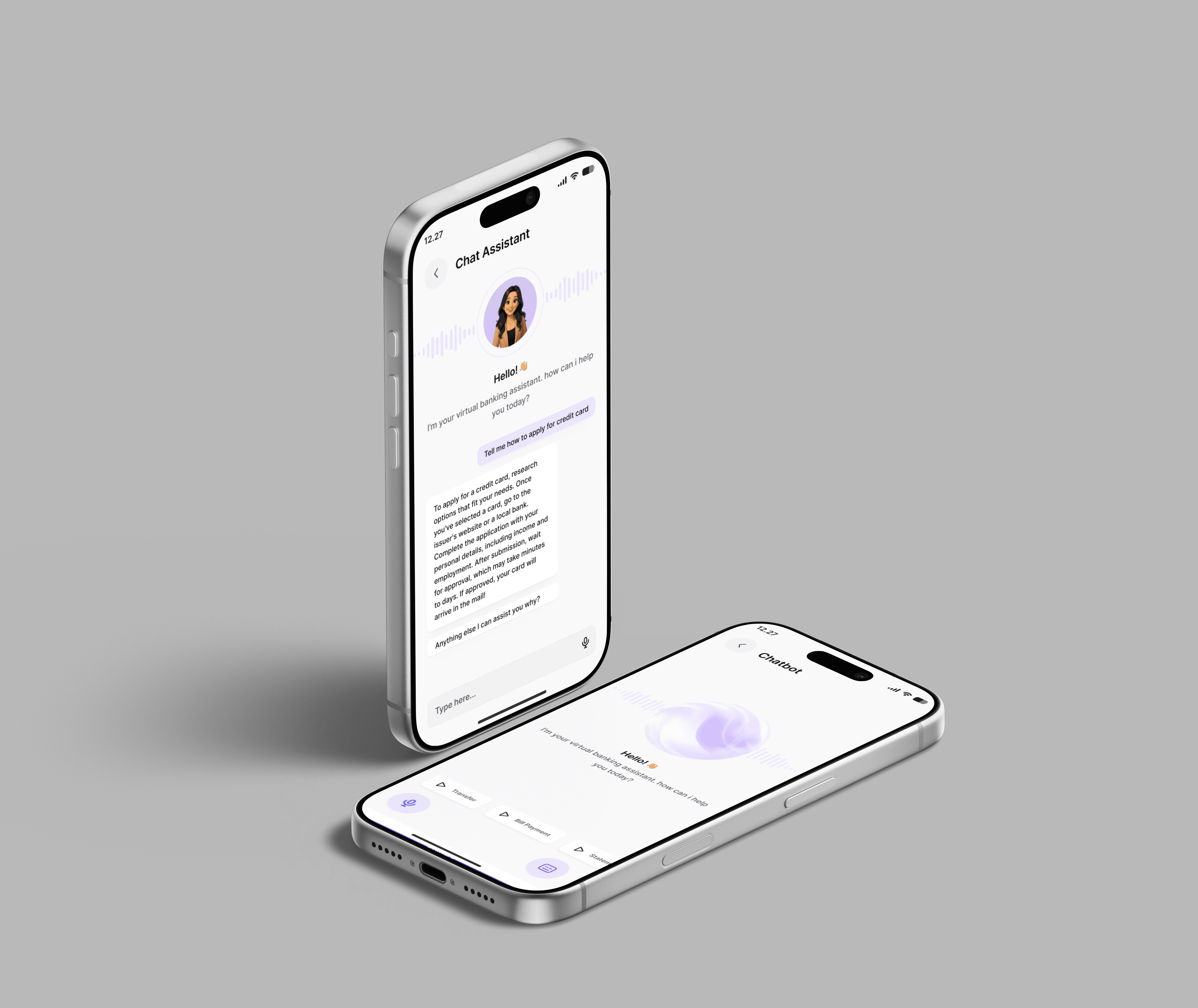
Chat Assistant → Type or voice input → Conversational response with action shortcuts. Reduces helpline dependency, available 24/7.

AI Chat Assistant Flow

Support

Chat Assistant → Type or voice input → Conversational response with action shortcuts. Reduces helpline dependency, available 24/7.

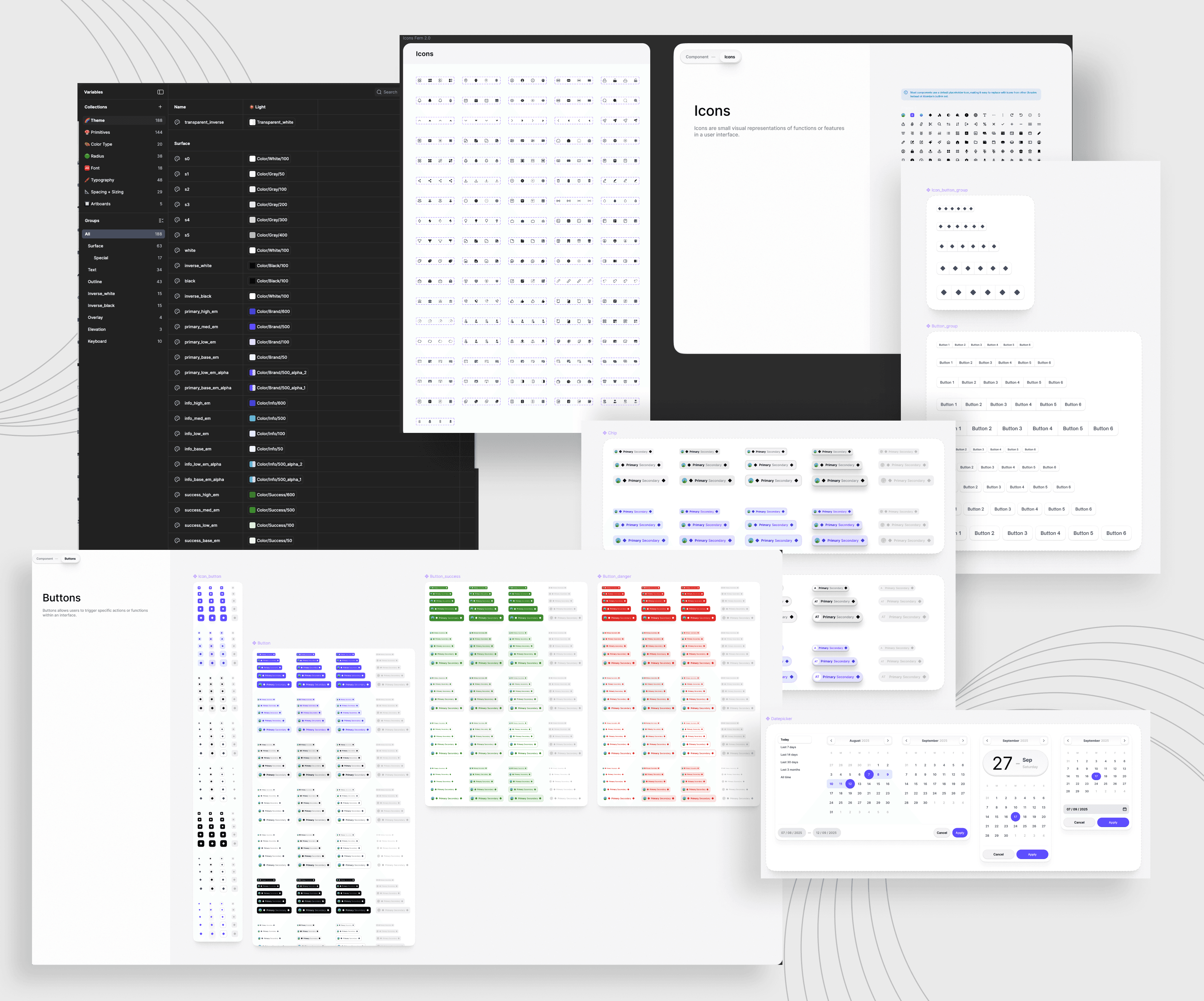
Design System

  • We built a shared component library in Figma before designing a single screen. It meant the whole app felt like it came from the same place — because it did.
Output

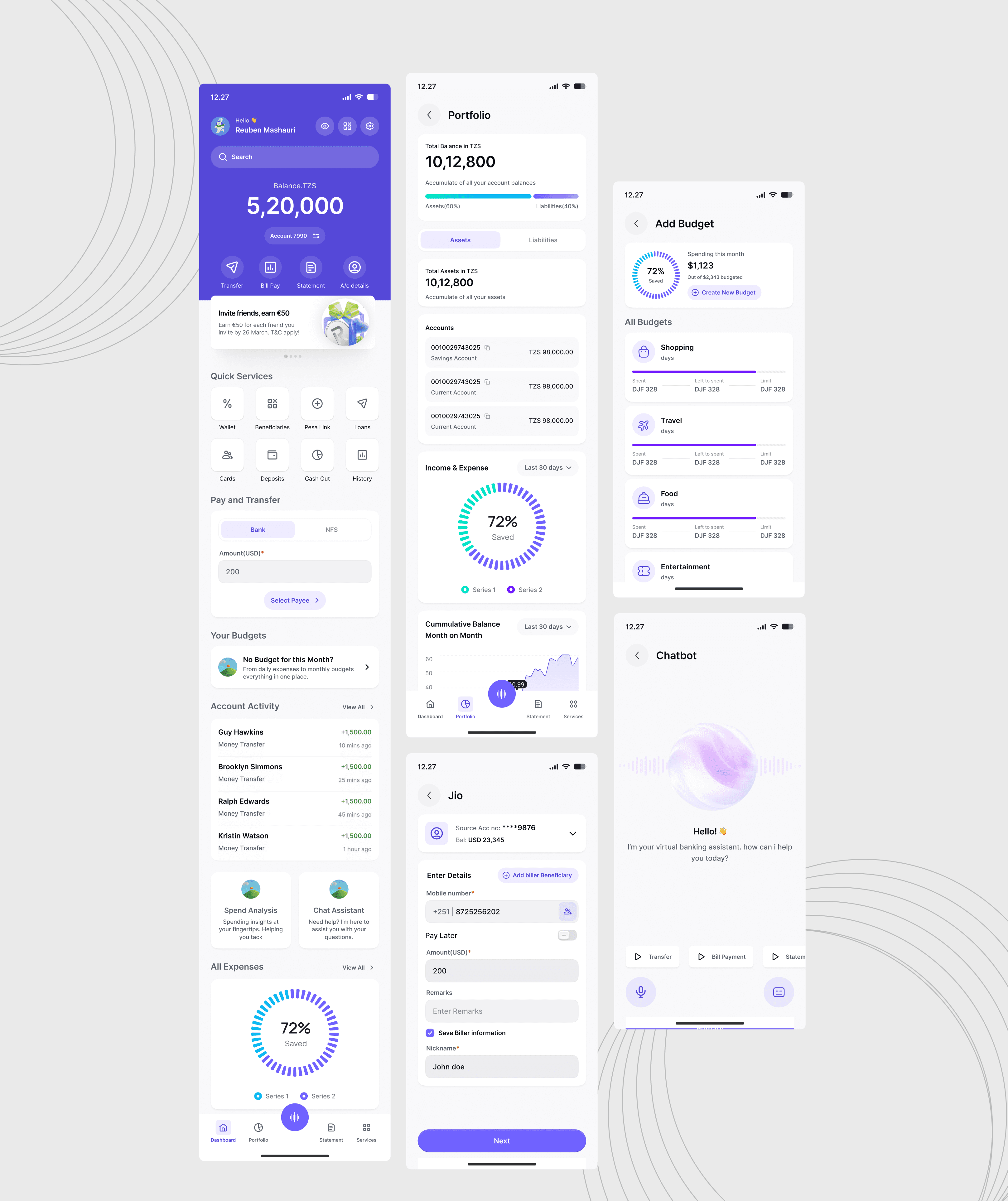
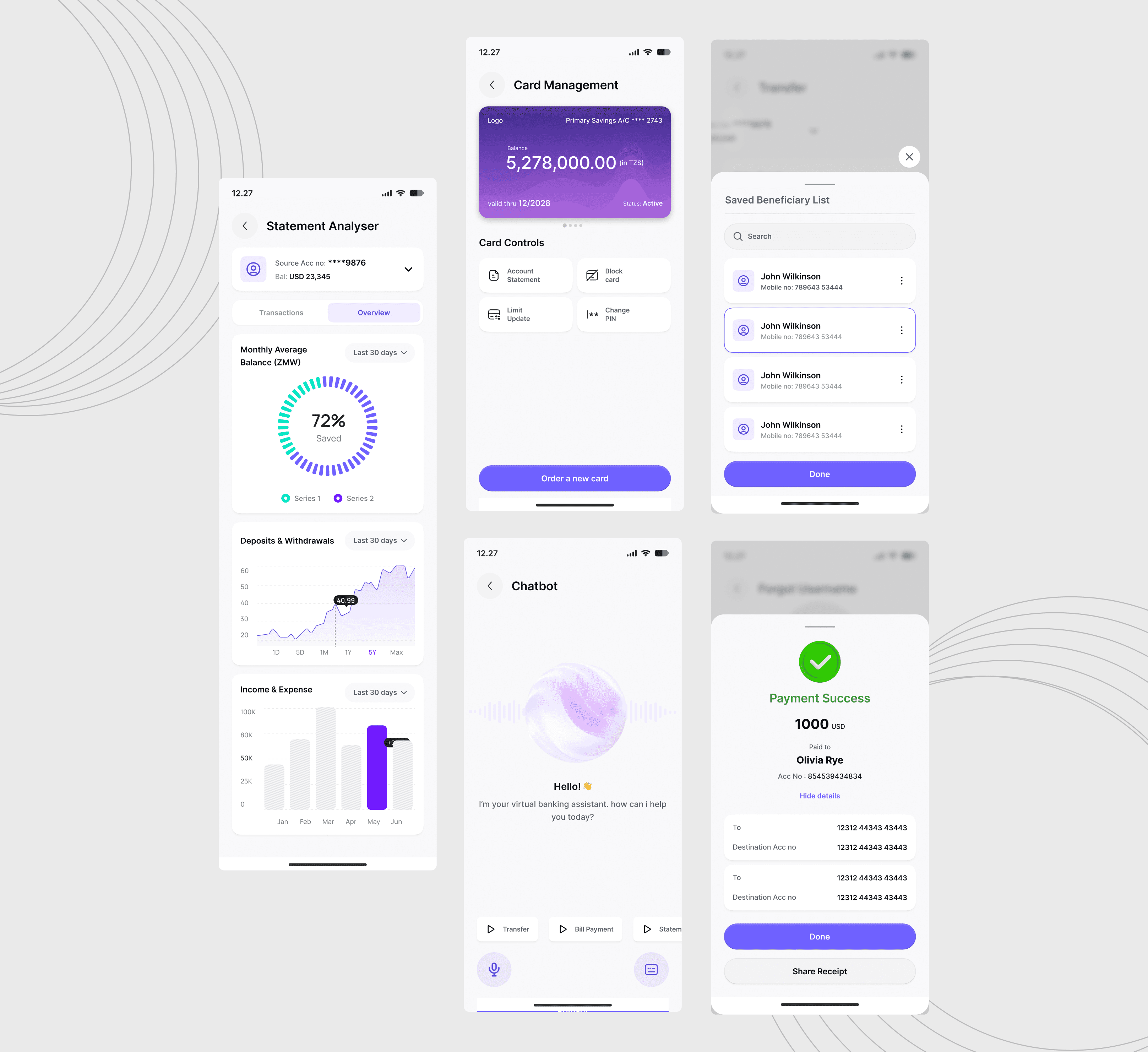
  • The final output was a complete mobile banking UI concept with a wide range of connected screens and journeys,

  • The final design aimed to make the app feel modern, calm and organised, while still supporting a rich set of banking features.
Impact

  • Transfer completion: Reduced from 7 steps to 4 with smart beneficiary recall — users complete transfers without re-entering details every time.

  • Customer support load: AI Chat Assistant handles tier-1 queries — balance checks, card blocking, transfer instructions — without human involvement.

  • Financial visibility: Statement Analyser gives users instant visual summaries of spending patterns. People are actually looking at their data now.

  • Branch dependency: Loan applications, deposit inquiries, and card management are fully self-service — no need to visit a branch for routine tasks.

  • Budget awareness: Budget tracker with category limits gives users a first-ever tool for monthly spending discipline within the bank's own app.

  • Transfer completion: Reduced from 7 steps to 4 with smart beneficiary recall — users complete transfers without re-entering details every time.

  • Customer support load: AI Chat Assistant handles tier-1 queries — balance checks, card blocking, transfer instructions — without human involvement.

  • Financial visibility: Statement Analyser gives users instant visual summaries of spending patterns. People are actually looking at their data now.

  • Branch dependency: Loan applications, deposit inquiries, and card management are fully self-service — no need to visit a branch for routine tasks.

  • Budget awareness: Budget tracker with category limits gives users a first-ever tool for monthly spending discipline within the bank's own app.

  • Transfer completion: Reduced from 7 steps to 4 with smart beneficiary recall — users complete transfers without re-entering details every time.

  • Customer support load: AI Chat Assistant handles tier-1 queries — balance checks, card blocking, transfer instructions — without human involvement.

  • Financial visibility: Statement Analyser gives users instant visual summaries of spending patterns. People are actually looking at their data now.

  • Branch dependency: Loan applications, deposit inquiries, and card management are fully self-service — no need to visit a branch for routine tasks.

  • Budget awareness: Budget tracker with category limits gives users a first-ever tool for monthly spending discipline within the bank's own app.

  • Transfer completion: Reduced from 7 steps to 4 with smart beneficiary recall — users complete transfers without re-entering details every time.

  • Customer support load: AI Chat Assistant handles tier-1 queries — balance checks, card blocking, transfer instructions — without human involvement.

  • Financial visibility: Statement Analyser gives users instant visual summaries of spending patterns. People are actually looking at their data now.

  • Branch dependency: Loan applications, deposit inquiries, and card management are fully self-service — no need to visit a branch for routine tasks.

  • Budget awareness: Budget tracker with category limits gives users a first-ever tool for monthly spending discipline within the bank's own app.

Learnings

  • Start with the error states: We left error handling too late in the process. When a transfer fails or a login is wrong, that's the moment users judge the entire app. Design those moments first, not last.

  • Accessibility needs a champion from day one: Contrast ratios and touch target sizes became a scramble near the end. Next time, these are baked in from the first wireframe — not retrofitted before handoff.

  • Fewer features, better executed: We shipped 15+ services. A few of them — like the referral banner and cash-out flow — felt rushed. Cutting scope earlier would have meant more polish on the things that actually matter most to users daily.

  • Test on real devices in context: Usability tests on a laptop with a prototype don't quite replicate someone checking their balance on a crowded matatu with bright sunlight on the screen. We need field testing, not just lab testing.

  • The AI assistant needs guardrails, not just answers: The chatbot gave good generic advice, but occasionally veered into responses that didn't fit the bank's specific policies. Content governance needs to be part of the AI design brief, not an afterthought.